Connect
Insert the SD card you want to examine. Recovery PhotoGraph identifies the card connected to your Mac.
 Recovery PhotoGraph
Made exclusively for Mac
Retrieve what looked lost
Scan SD cards for deleted or inaccessible photos, camera RAW files, and videos. See what can be recovered for free—pay for that card only when you are ready to export.
Version 1.02 (build 103) · Requires macOS 15 or later. Scans happen locally on your Mac.
Windows version coming soon.
A careful recovery workflow
Insert the SD card you want to examine. Recovery PhotoGraph identifies the card connected to your Mac.
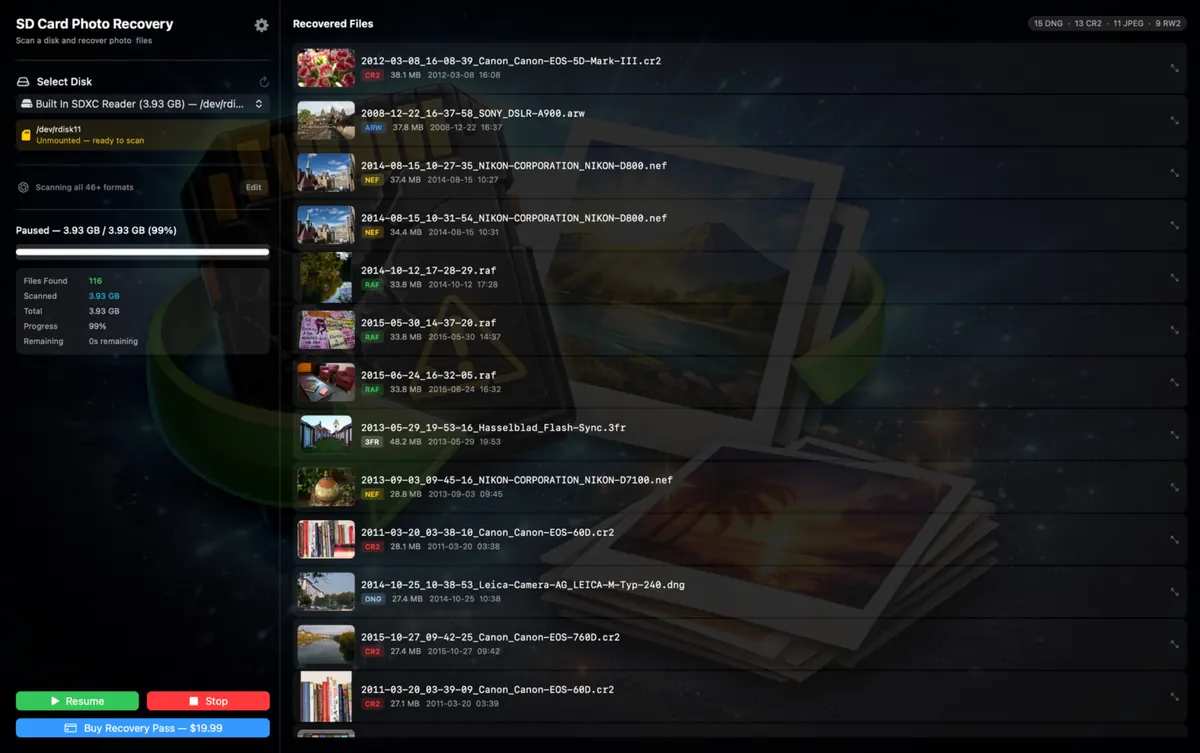
Choose the formats that matter and watch recoverable files appear as the scan progresses.
Choose a separate destination and export the recovered files you want to keep.
Built for cameras
Recovery PhotoGraph recognizes common image and video formats plus camera RAW files from Canon, Nikon, Sony, Fujifilm, Panasonic, Olympus, Leica, Pentax, Hasselblad, Phase One, Sigma, Kodak, and others.
Fair by design
Scanning and previewing found files is free. If Recovery PhotoGraph finds what you need, one reasonably priced recovery pass unlocks export from that SD card. Each new card requires its own pass. There is no subscription and no charge just to discover whether recovery is possible.
Recovery rule number one
Stop using the SD card as soon as you notice data loss. Save recovered files to a different drive so you do not overwrite the data you are trying to retrieve. No recovery tool can guarantee every file will be recoverable.
Mac SD card recovery questions
Recovery PhotoGraph scans the SD card directly for recognizable photo, camera RAW, and video data. It can find files even when they no longer appear in Finder, provided their data has not been overwritten or the card has not physically failed.
Yes. Downloading the Mac app, scanning an SD card, and previewing the files it finds are free. You purchase one recovery pass for that specific card only when you decide to export.
The scanner recognizes common Canon, Nikon, Sony, Fujifilm, Panasonic, Olympus, Leica, Pentax, Sigma, Hasselblad, Phase One, and Kodak RAW formats, alongside JPEG, HEIC, PNG, TIFF, MOV, MP4, and other media formats.
No. SD card scanning and file recovery happen locally on your Mac. Payment is handled separately through secure Stripe checkout; your recovered photo and video contents are not sent to the recovery-pass service.
Stop using the card. New photos or formatting can overwrite recoverable data. Scan the card as soon as practical, and always export recovered files to a different drive.
No software can repair broken electronics or guarantee every file. If macOS cannot detect the card at all, or the card disconnects repeatedly, a professional data-recovery laboratory may be the safer choice.
Available exclusively for Mac
Scan and preview for free. Pay one fair fee for that SD card only when you see files worth exporting.